Signature Background Remover — Extract Clean Ink Signatures in Your Browser
हस्ताक्षर व साइन का बैकग्राउंड हटाएं — ट्रांसपेरेंट PNG या शुद्ध सफेद JPG (100% मुफ़्त)
Strip grey paper shadows from mobile photos of your handwritten signature or company stamp. Export a transparent PNG for PDF documents or a pure white (#FFFFFF) JPG for Indian recruitment and ID portals—100% locally on your device.
Signature & Stamp Background Cleaner · सिग्नेचर बैकग्राउंड हटाएं
Upload any portrait, product, or pet photo. Uses deep neural segmentation (ISNet) directly on your device via multi-core SIMD WebAssembly.
JPG, PNG, WebP · Max 20 MB · Privacy Guaranteed
Or test in 1-click with a real sample:
Private Neural Matting: Powered by ISNet deep learning architecture running entirely in your browser. No files are ever sent to a cloud server.
How to Clean Up a Phone Photo of Your Signature in Four Steps
चार आसान चरणों में अपने साइन का बैकग्राउंड साफ करें
- Sign on unlined white paper: Use a smooth black or dark-blue gel or rollerball pen on blank A4 paper, crop tightly around the signature box on your phone, and load the image above.
- Choose Transparent PNG or Pure White: Keep Transparent PNG active for digital PDF signing and invoice stamps, or click Pure White (#FFFFFF) if you are preparing a `.jpg` file for an online application form.
- Refine stroke crispness: Adjust the Edge Cutout Sensitivity slider so thin pen loops and dotting remain unbroken while paper grain disappears.
- Save your file locally: Click Download PNG (Lossless) for document overlays or Download JPG (Form Ready) for government portals.
Before and After Signature Extraction Examples
सिग्नेचर कटआउट बिफोर और आफ्टर उदाहरण
See how shadowed smartphone photos of paper signatures convert into transparent stamps or pure white exam strips.
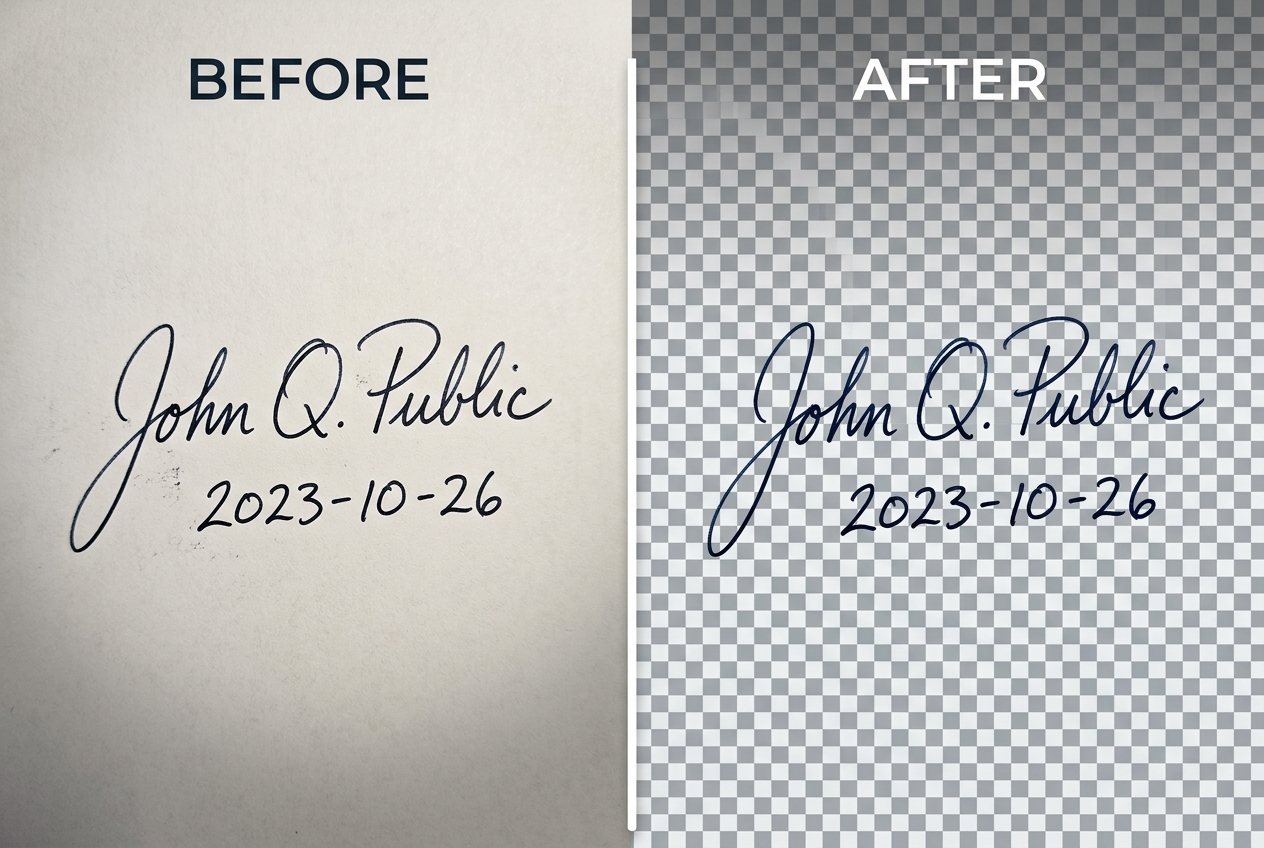
Transparent PNG Stamp vs White Background JPG for Exam Portals
People searching to remove the background from a signature usually have one of two very different workflows:
- Digital PDF & Invoice Signing (Transparent PNG): Chartered accountants, freelancers, and small business owners placing an authorised signature over a dotted line in Microsoft Word, Google Docs, or Tally/GST invoices need an alpha-channel
.pngso the signature strokes float cleanly over the page without a white rectangle blocking the text underneath. - Indian Recruitment & Entrance Portals (Pure White JPG): Online application portals for SSC, UPSC, IBPS, SBI, GATE, and PAN cards reject transparent
.pngfiles and require a wide rectangular.jpgimage (commonly4.0 × 2.0 cmor140 × 60 pixelsbetween10 KB and 20 KB) where the paper behind the ink is bright white rather than muddy grey.
If you are preparing both your candidate photograph and your signature for the same recruitment form, pair this tool with our Passport Size Photo Maker and check our Indian passport and exam photo specification guide.
How to Photograph a Handwritten Signature Without Phone Shadow
The biggest mistake when photographing a signature on a desk is holding your phone directly parallel above the sheet under a ceiling bulb. The phone body casts a dark rectangle right across the middle of your handwriting, forcing any threshold filter to either clip half your name or leave a dark smudge in the corner.
Instead, tape the signed sheet vertically against a flat wall facing a window, or step back slightly on your desk and use 2× optical/digital zoom so your phone is angled away from the overhead light path. For general object and portrait cutouts, you can also use our full Photo Background Remover or read our guide on removing backgrounds for transparent PNGs. Need clean certificate or document backdrops? Explore our Plain Photo Backgrounds, HD Photo Backgrounds, and Photo Studio Backgrounds.
When Signature Extraction Struggles (Ruled Lines & Faint Ballpoint Ink)
Automated background removal separates foreground ink from paper using luminance and contrast gradients. It struggles when you sign across ruled notebook lines, watermarked letterhead paper, or dry ballpoint pen strokes that skip and fade into the paper grain. Always sign with a fresh dark gel or rollerball pen on plain unlined white paper.
Related Tools, Collections, and Guides
Passport Size Photo Maker
Prepare a matching pure-white background candidate portrait for Indian exam and ID forms.
Indian Passport & Exam Photo Size Guide
Check photo and signature aspect ratios, KB limits, and rejection triggers.
Photo Background Remover
Isolate portraits, products, and logos onto transparent PNG canvases.
Frequently Asked Questions About Signature Background Removal (अक्सर पूछे जाने वाले सवाल)
Why does my white paper signature look dull grey when I take a photo with my phone?
Smartphone camera meters average the entire scene to middle grey (around 18% reflectance). When your frame is filled mostly with bright white paper, the camera automatically underexposes the image, turning the paper into #B8BEC6 grey and casting a phone shadow across the ink.
Should I download my cleaned signature as a PNG or a JPG?
Download a PNG (Lossless) if you are placing the signature on top of a Word document, PDF contract, or GST invoice where the text lines underneath must stay visible. Download a JPG (Form Ready) with the Pure White (#FFFFFF) tab selected if you are uploading to an Indian exam portal (SSC, UPSC, IBPS, GATE), as those portals require rectangular white-background `.jpg` files.
Do Indian recruitment exams require black ink or blue ink for signatures?
Different recruitment boards specify either black ballpoint/gel ink or dark blue ink on unlined white paper, and some disallow signatures written in ALL CAPITAL LETTERS.
Is my handwritten signature stored on any server when I use this tool?
Never. Handwritten signatures are sensitive financial and legal identifiers. PhotoBackground.in processes every pixel locally inside your browser Web Worker—nothing leaves your device.
Can this tool remove ruled notebook lines running through my signature?
If horizontal blue or grey notebook lines have the same darkness as your pen strokes, automated extraction may keep fragments of the ruled lines. Always sign on a blank, unlined white A4 sheet before taking the photo.