Photo Background Remover — Export Transparent PNGs
फोटो का बैकग्राउंड हटाएं — पारदर्शी ट्रांसपेरेंट PNG कटआउट (100% मुफ़्त व प्राइवेट)
Strip the background from portraits, products, or signatures in your browser and save a clean 24-bit transparent PNG cutout with zero watermarks.
Transparent PNG Background Remover · बैकग्राउंड हटाएं (PNG)
Upload any portrait, product, or pet photo. Uses deep neural segmentation (ISNet) directly on your device via multi-core SIMD WebAssembly.
JPG, PNG, WebP · Max 20 MB · Privacy Guaranteed
Or test in 1-click with a real sample:
Private Neural Matting: Powered by ISNet deep learning architecture running entirely in your browser. No files are ever sent to a cloud server.
How to Remove a Photo Background Step by Step
आसान स्टेप्स में फोटो बैकग्राउंड रिमूव करें
- Select your source image: Upload a JPG, PNG, or WebP file up to 20 MB, or launch one of the built-in sample photos above.
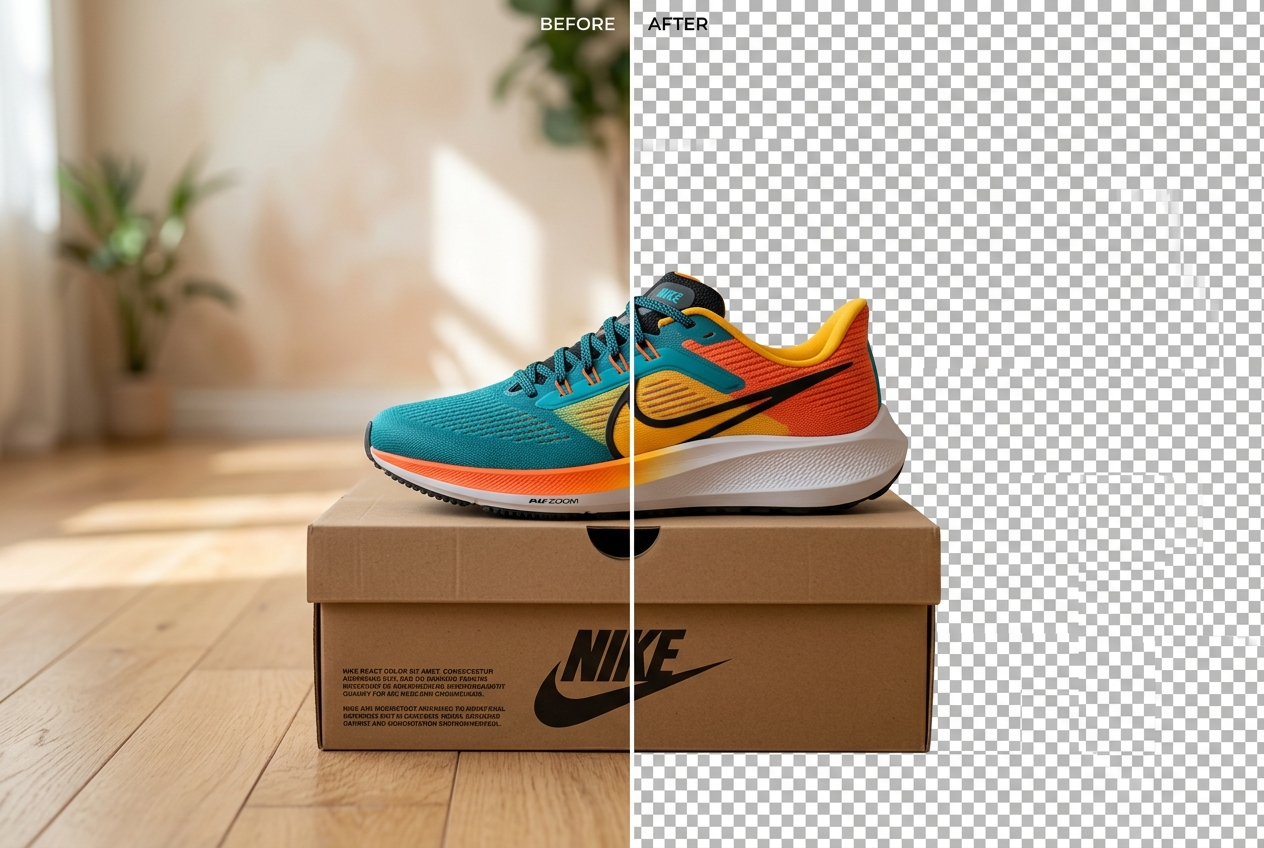
- Inspect the checkerboard cutout: The grey-and-white checkerboard pattern indicates 100% transparent alpha pixels around your subject.
- Refine edge sensitivity if needed: Move the Edge Cutout Sensitivity slider left or right to tighten the border around shoulders, hair, or product packaging.
- Click Download PNG (Lossless): Save the transparent PNG directly to your phone or computer so you can drop it into Canva, Picsart, Photoshop, or a presentation slide.
Transparent Cutout Examples (Before and After)
ट्रांसपेरेंट कटआउट बिफोर और आफ्टर उदाहरण
Slide between the original camera shot and the extracted alpha-channel PNG cutout.
Clear Photo Background vs. White Background: Why File Format Matters
A common mistake when trying to clear a photo background is saving the finished cutout as a `.jpg` file. The JPEG standard only stores three colour channels (Red, Green, and Blue) and cannot store transparency. If you need a see-through sticker that sits cleanly over a coloured poster or one of our Photo Editing Backgrounds, you must export a 32-bit RGBA `.png` file.
Conversely, if you are uploading a photograph to an Indian government exam portal or marketplace that explicitly rejects PNG transparency, use our White Background Photo Maker or read our guide on how to make a photo background pure white and export as a standard JPG.
Crop Photo Background Tightly Around Your Subject
Many users search for “crop photo background” when they want to trim away wide margins of empty wall before removing the remaining backdrop. Cropping your photo tightly around the person or product before running segmentation has two major benefits:
- Higher pixel density on the subject: If your subject occupies only 20% of a wide room photo, cropping first ensures the full 2048-pixel processing budget is spent on the face, hair, and clothing rather than empty ceiling tiles.
- Cleaner border sampling: Cropping out distant clutter (such as a doorway or window frame on the edge of the shot) leaves a uniform wall around the perimeter, allowing the Web Worker to isolate the subject cleanly. Once extracted, you can composite the cutout in our Photo Background Changer or place it over plates from our HD Photo Backgrounds, Black Background Photos, and Photo Studio Backgrounds collections.
For a complete walkthrough of alpha extraction, WhatsApp PNG sharing, and edge cleanup, see our tutorials on how to remove the background in a photo for clean PNG cutouts and how to change the background of a photo.
When Automatic Background Removal Struggles
In-browser alpha extraction works best when there is clear contrast between the subject and the perimeter wall. It can leave semi-transparent fringes around translucent veil fabrics (such as net dupattas), fine pet fur, chrome reflections that mirror the room, or heavy cast shadows directly beneath shoes.
File Formats, Resolution Limits, and On-Device Privacy
Upload JPG, PNG, or WebP files up to 20 MB. Oversized images above 2048px are scaled down automatically to protect mobile browser memory. Every step executes inside your local browser tab—no image is ever uploaded or logged.
Related Tools, Collections, and Guides
How to Remove the Background in a Photo
Export 32-bit transparent PNGs and stop WhatsApp from turning transparent cutouts black.
Photo Frame Backgrounds
20 archival gallery mount mats, teakwood borders, and album frames for cutouts.
HD Photo Backgrounds (1080p & 4K)
High-density marble, wood, and gradient plates for placing transparent PNG cutouts.
Frequently Asked Questions About Removing Photo Backgrounds (अक्सर पूछे जाने वाले सवाल)
Why did my downloaded cutout turn black or white when shared on WhatsApp?
Standard WhatsApp image compression converts transparent PNGs into JPGs and fills the transparent alpha channel with solid white or black. To preserve transparency when sending a file over WhatsApp, attach the exported PNG using the Document option instead of Gallery.
Should I export as PNG or JPG when I need a transparent background?
Always click Download PNG (Lossless) when you want the background to remain see-through. The JPG format does not support an alpha transparency channel, so our JPG button automatically fills transparent regions with pure white.
How does the tool handle holes inside objects like mug handles or bicycle spokes?
Our Web Worker evaluates each pixel against the outer background colour palette. Enclosed background patches (such as the gap inside a teacup handle) are cleared cleanly when they match the surrounding wall colour, though tiny intricate spokes may need higher sensitivity.
Can I remove the background from a scanned handwritten signature or stamp?
Yes. Photograph or scan the signature on unlined white paper under even daylight, upload it here, and adjust the Edge Cutout Sensitivity slider so the paper becomes transparent while the dark ink remains opaque.
Is there a daily limit on how many transparent cutouts I can export?
No. Because your own device runs the Web Worker segmentation locally, there are no server GPU quotas, credit counters, or daily download caps.