Photo Background Changer Online
ऑनलाइन फोटो बैकग्राउंड बदलें — स्टूडियो, सॉलिड कलर या नया सीन (100% सुरक्षित)
Replace the background of any portrait or product photo right inside your browser—choose a studio lighting backdrop, solid colour, or soft bokeh without uploading your image to a remote server.
Photo Background Changer Workspace · फोटो बैकग्राउंड बदलें (100% Private)
Upload any portrait, product, or pet photo. Uses deep neural segmentation (ISNet) directly on your device via multi-core SIMD WebAssembly.
JPG, PNG, WebP · Max 20 MB · Privacy Guaranteed
Or test in 1-click with a real sample:
Private Neural Matting: Powered by ISNet deep learning architecture running entirely in your browser. No files are ever sent to a cloud server.
Change Photo Background in Four Steps
चार आसान चरणों में फोटो का बैकग्राउंड बदलें
- Open your photograph: Tap Choose Photo above to select a JPG, PNG, or WebP image from your phone or computer, or click one of the three sample presets to test the workflow first.
- Wait for local Web Worker isolation: The browser initializes its segmentation worker and separates your subject from the surrounding wall in a couple of seconds.
- Select your new backdrop: Switch between Studio Scene vignettes, Solid Colour presets, Pure White, or Blur, and fine-tune the Edge Cutout Sensitivity slider if needed.
- Download PNG or JPG: Export a lossless PNG for further design work or a compact JPG ready for sharing and online forms.
Before and After Replacement Examples
बिफोर और आफ्टर बैकग्राउंड चेंज परिणाम
Use the comparison slider below to inspect how replacing a busy room or workshop wall transforms portrait and tabletop product shots.
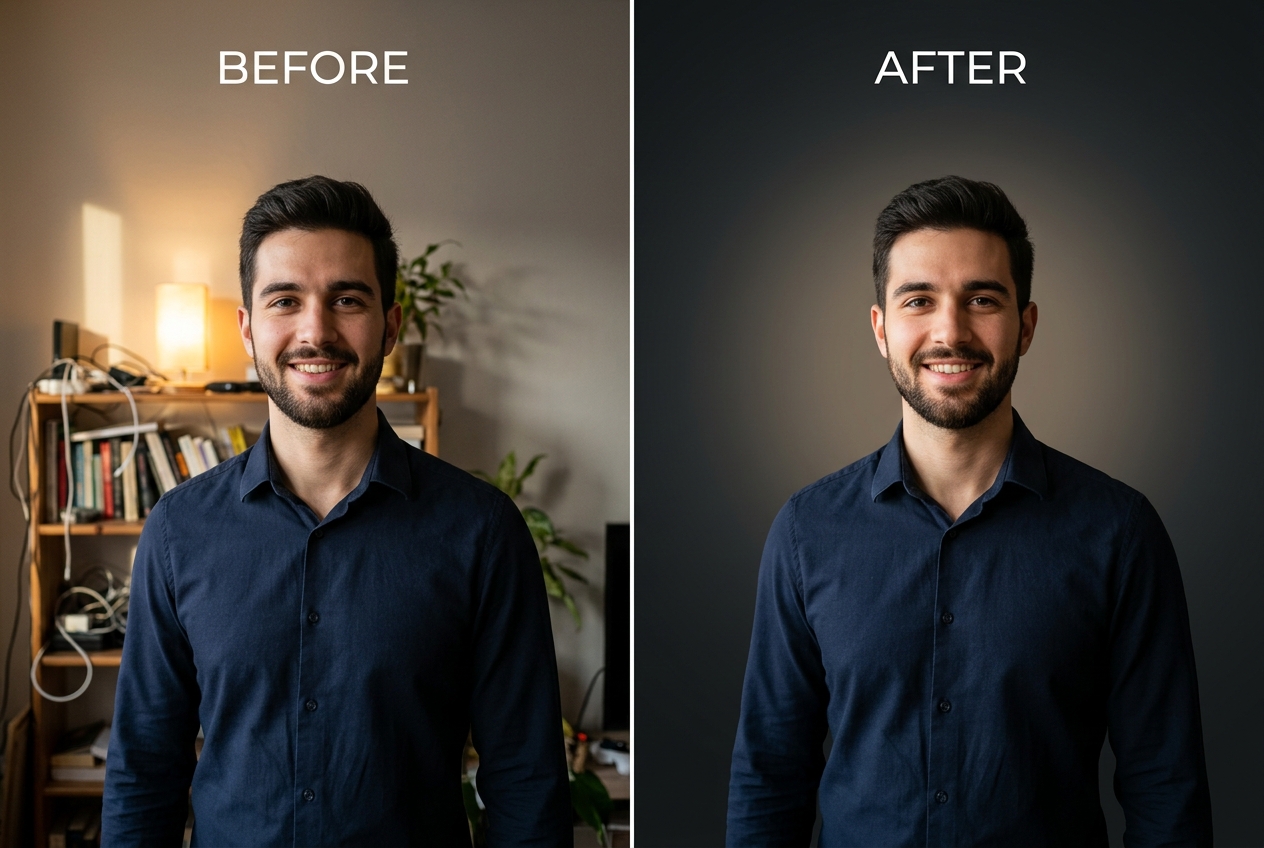
Photo Background Change Online Free: How Browser Processing Works
When people search for a free online photo background changer in India, they often run into two frustrations: either the website forces them to create an account and limits exports to blurry 500-pixel previews, or it uploads private family and ID photos to an unknown cloud server. Because our tool executes inside your browser's Web Worker thread, your phone or laptop performs the segmentation math itself.
If you want to composite your cutout over a cinematic rooftop terrace, monsoon street, or heritage archway in Picsart or Photoshop, first export a transparent cutout using our Photo Background Remover and pair it with a full-resolution plate from our Photo Editing Backgrounds, Boy Photo Editing Backgrounds, Girl Photo Editing Backgrounds, Family Photo Backgrounds, or HD Photo Backgrounds collections.
Background Photo Edit Tips for Realistic Lighting and Edges
Even a sharp cutout can look artificial if the new backdrop contradicts the camera angle or lighting of the original shot. Follow these three practical rules during any background photo edit:
- Match lighting direction: Look at the shadow under the nose and chin. If the light came from the left window, pick a plate from our Photo Studio Backgrounds or Nature Photo Backgrounds with left-side illumination.
- Keep horizon lines at waist or chest level: Placing a half-body portrait above a high horizon line makes the person appear to float. We cover horizon alignment in detail in our complete guide on how to change the background of a photo.
- Use pure white only when required: For passport, SSC, or UPSC forms, switch to our dedicated White Background Photo tool and read our tutorial on how to make a photo background pure white without losing collar contrast.
When the Tool Struggles (Honest Limitations)
No automated background changer is flawless. You will get the best results when your subject stands clearly in front of a relatively plain wall. Expect manual touch-ups or try our Blur Photo Background tool instead when working with:
- Fine flyaway hair and backlit curls: Thin strands against a bright sky often retain a faint halo of the original background colour.
- Transparent glass and spectacles: The background visible through eyeglass lenses or water glasses may not match the new backdrop behind the head.
- Low-Contrast Clothing: A beige shawl against a beige sandstone wall or dark hair in a dimly lit room gives the edge detector very little colour separation.
Supported File Formats, Size Limits, and Privacy
The workspace accepts standard JPG, PNG, and WebP photographs up to 20 MB. To prevent browser tab crashes on mid-range smartphones, images exceeding 2048 pixels on their longest side are automatically downscaled before Web Worker segmentation. Your photos never leave your device.
Related Tools, Collections, and Guides
Photo Editing Backgrounds (20 HD Plates)
Download full-HD urban dusk, archway, and bokeh backgrounds with perspective floors.
How to Change the Background of a Photo
Step-by-step lighting, horizon alignment, and hair-edge troubleshooting guide.
Photo Background Remover
Export clean transparent PNG cutouts for stickers and multi-layer design.
Frequently Asked Questions About Changing Photo Backgrounds (अक्सर पूछे जाने वाले सवाल)
How do I make a replaced background look natural around shoulder and hair edges?
Pick a replacement background whose brightness is reasonably close to the room where you took the original photo, and adjust the Edge Cutout Sensitivity slider slightly downward if you notice a bright outline along the shoulders.
Can I upload my own custom background image after cutting out the subject?
You can immediately apply any studio vignette, solid colour, or depth blur inside the tool, or export a lossless transparent PNG and layer it over any high-resolution plate from our Photo Editing Backgrounds collection.
Is this online photo background changer completely free of watermarks?
Yes. Every PNG and JPG you export from PhotoBackground.in is clean, full resolution (up to 2048px on the longest edge for browser memory stability), and completely free of logos or watermarks.
Why does an indoor photo look strange when placed on a bright sunlit beach background?
Indoor tube-lights cast flat, cool illumination across the face, whereas an outdoor beach scene has strong directional sunlight and warm horizon bounce. Matching indoor cutouts with studio vignettes or shaded garden plates produces a far more believable composite.
What happens to my original photograph after I close the browser tab?
Because segmentation runs inside your browser memory using a Web Worker, closing the tab or clicking Start Over immediately discards the image buffers from RAM. Nothing is ever stored on our servers.