Blur Photo Background Online (Portrait Bokeh Effect)
फोटो बैकग्राउंड ब्लर करें — DSLR जैसा नेचुरल पोर्ट्रेट बोकेह इफेक्ट (100% मुफ़्त)
Soften distracting street, office, or room clutter behind your subject with an adjustable blur slider right inside your browser.
Interactive Background Blur & Bokeh Workspace · बैकग्राउंड ब्लर करें
Upload any portrait, product, or pet photo. Uses deep neural segmentation (ISNet) directly on your device via multi-core SIMD WebAssembly.
JPG, PNG, WebP · Max 20 MB · Privacy Guaranteed
Or test in 1-click with a real sample:
Private Neural Matting: Powered by ISNet deep learning architecture running entirely in your browser. No files are ever sent to a cloud server.
How to Blur the Background of a Photo in Four Steps
चार आसान स्टेप्स में फोटो बैकग्राउंड को ब्लर करें
- Open your photo: Choose any JPG, PNG, or WebP image from your phone or laptop, or click the Casual Street Shot sample above.
- Automatic foreground mask: The Web Worker isolates the person or object in the foreground while keeping a copy of the original background layer underneath.
- Adjust the Background Blur Strength slider: Drag between 4px (subtle depth separation) and 32px (creamy studio bokeh) while watching the live canvas preview.
- Download your portrait: Save the finished image as a high-resolution PNG or JPG with zero watermarks.
Before and After Background Blur Examples
बैकग्राउंड ब्लर बिफोर और आफ्टर उदाहरण
Compare the unedited wide-depth snapshot against the softened bokeh output.
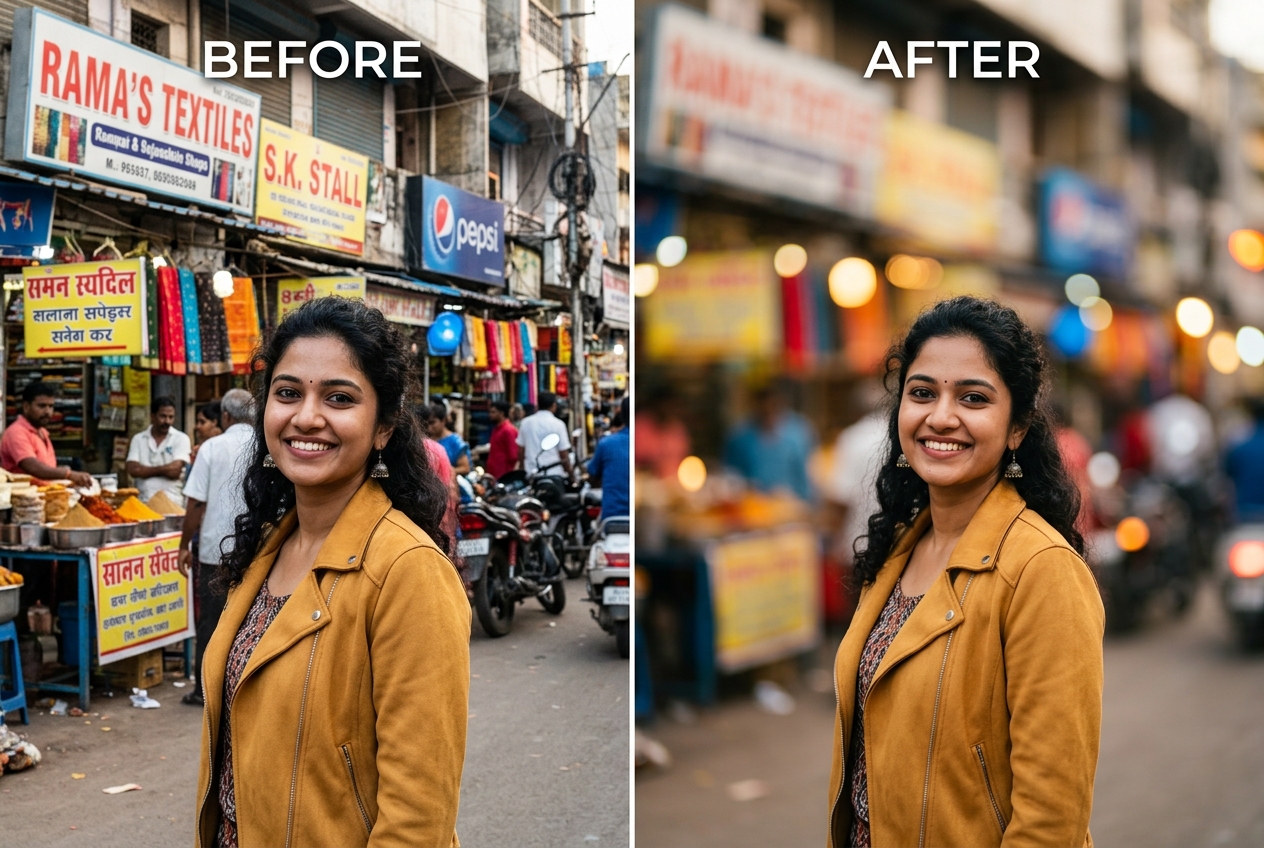
Choosing the Right Blur Radius for Natural Portrait Depth
Smartphone cameras have tiny physical sensors, which means almost everything from two metres to infinity stays in sharp focus unless software intervenes. When you shoot a portrait at a wedding venue, college campus, or busy bazaar, power cables and bystanders compete with the subject's face.
Rather than replacing the entire environment—which you can do when needed in our Photo Background Changer or by downloading pre-blurred outdoor plates from our Nature Photo Backgrounds, Photo Editing Backgrounds, and Photo Studio Backgrounds collections—blurring the real room preserves the authentic lighting and colour harmony of the moment.
Why Blurring Forgives Hair Edges Better Than Solid Cutouts
If you have ever tried to place a portrait with curly or wind-blown hair onto a stark white canvas using a Photo Background Remover, you know how easily a 2-pixel colour fringe can give away the edit. When you blur the existing background instead of discarding it, the colour just outside the hair boundary is still the same ambient colour that illuminated the hair in real life.
Want to learn when to blur versus when to replace the scene completely? Check our tutorials on how to blur the background in a photo naturally, how to change the background of a photo, and how to make a photo background pure white.
When Background Blur Struggles (Depth Planes and Foreground Objects)
Unlike a real optical lens that blurs gradually with distance, browser segmentation applies a uniform Gaussian blur to the background layer. As a result, the floor directly beside a standing person's shoes will blur by the same amount as a building 50 metres behind them, and bright point lights at night will soften into smooth circles rather than hexagonal aperture bokeh.
Related Tools, Collections, and Guides
How to Blur Background in a Photo
Pick the right pixel blur radius for headshots, waist-up portraits, and full-body shots.
Nature Photo Backgrounds
20 outdoor garden, tea estate, and golden-hour backdrops with natural bokeh.
Love Photo Backgrounds
20 warm fairy-light bokeh and sunset couple backdrops.
Frequently Asked Questions About Blurring Photo Backgrounds (अक्सर पूछे जाने वाले सवाल)
What blur intensity looks most like a real DSLR lens rather than a fake filter?
A moderate blur radius between 10px and 16px usually looks the most natural. Pushing the slider above 26px completely melts background shapes into flat colour blobs, which can look artificial if the subject was photographed with a wide-angle phone lens.
Why does a blurred background look more natural on frizzy hair than a solid colour swap?
When you blur the original background, the pixels immediately behind loose hair strands still share the exact same ambient colour and brightness as the room, hiding minor mask transitions that would stand out against a stark white or black replacement canvas.
Can I blur the background of an existing photo that was not taken in Portrait Mode?
Yes. Unlike smartphone Portrait Mode—which requires dual-camera depth data at the moment you press the shutter—our Web Worker segments any standard 2D JPG, PNG, or WebP file from your gallery.
Why do objects held in front of or slightly behind the person sometimes blur unevenly?
Single-image segmentation divides a photo into two flat layers (foreground subject and background) rather than measuring true 3D distance in centimetres. A table edge right next to the waist may be classified as either fully sharp or fully blurred.
Does blurring the background reduce the resolution of the person in the foreground?
No. The Gaussian blur filter is applied strictly to the background layer; the foreground subject pixels are composited at full working resolution on top.