How to Blur the Background in a Photo Without Fake Cutout Halos
ट्यूटोरियल: फोटो बैकग्राउंड को ब्लर कैसे करें (नेचुरल पोर्ट्रेट बोकेह)
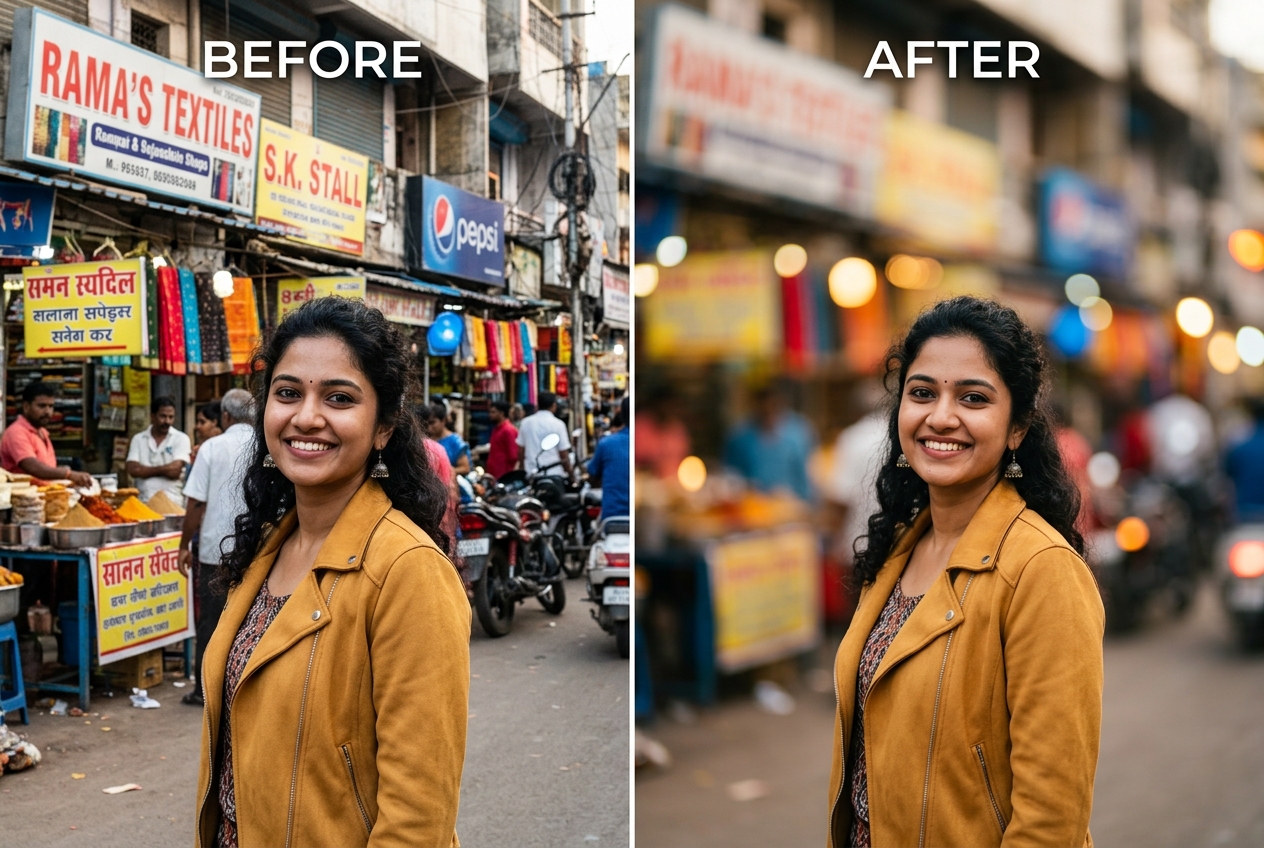
To blur the background in a photo naturally, separate the subject onto a feathered foreground mask, apply a moderate 8-to-16 pixel optical blur to the background layer, and match the blur strength to how close the camera stood to the person. Keeping edge transitions slightly feathered prevents the harsh “cardboard sticker” outline common in one-tap phone filters.
Why Phone Portrait Mode Often Misses Ear Loops and Hair Gaps
Dual-camera smartphones estimate depth at the moment you press the shutter, often under split-second processing limits. As a result, built-in Portrait Mode frequently blurs out the rim of eyeglasses, the tips of a dupatta, or outer hair curls—while leaving a distracted patch of wall sharp right between your arm and waist.
When you blur a normal, all-sharp photograph afterward using an adjustable in-browser tool, you gain two critical advantages: you can dial the exact blur radius in pixels, and you can fine-tune the edge sensitivity slider while watching the live boundary around ears and shoulders.
Step-by-Step: Blurring a Photo Background in Your Browser
Follow these four steps in our Blur Photo Background tool to soften room clutter or busy street backgrounds without uploading your photo to a remote server:
- Step 1: Open your unblurred original photo
Select a sharp JPG, PNG, or WebP photo where the subject is clearly in focus. Avoid starting with an image that already has heavy phone Portrait Mode artifacts, because double-blurring an existing artificial edge exaggerates halos.

Figure 1: PhotoBackground.in interface with sharp source portrait loaded for in-browser depth separation. - Step 2: Let the Web Worker isolate the subject with 3×3 edge feathering
The browser worker separates your portrait from the background and applies a soft 3×3 pixel gradient along the mask border. This micro-feathering ensures that the sharp shoulder edge transitions smoothly into the blurred background rather than stopping at a jagged stair-step line.
- Step 3: Set the Background Blur Strength slider (4 px to 32 px)
Start at the default `14 px` setting and drag the slider left or right while watching the background highlights. Aim to soften readable text, wall switches, or distant licence plates just enough that they become smooth colour shapes without losing the sense of the room's geometry.
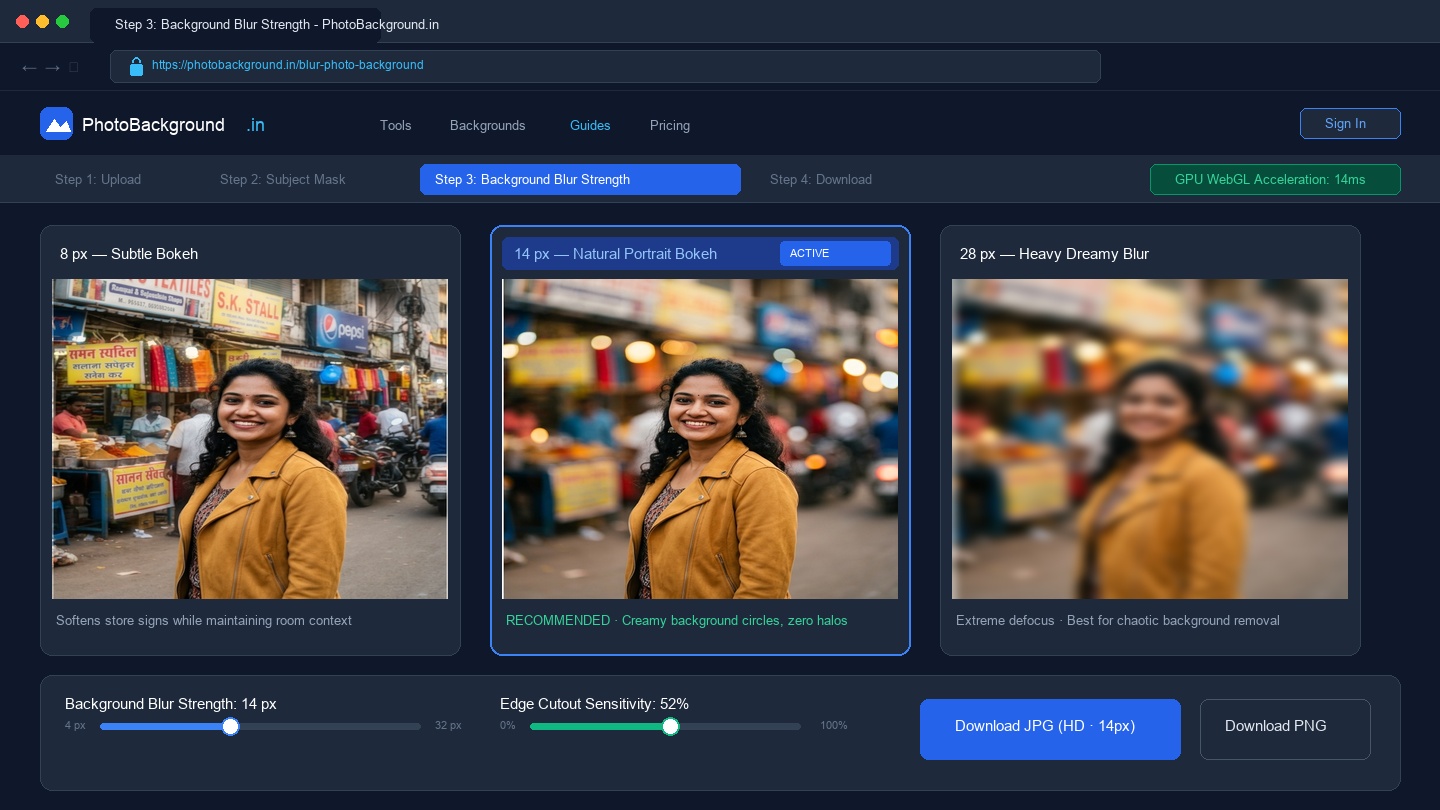
Figure 2: Three-level background bokeh comparison (8px, 14px recommended, and 28px) with GPU-accelerated slider on PhotoBackground.in. - Step 4: Fine-tune Edge Cutout Sensitivity and export
If a thin sliver of bright wall clings to dark hair, nudge the Edge Cutout Sensitivity slider up by 4 to 6 points. Once the boundary looks clean, click Download JPG for social media or Download PNG for lossless archiving.
Choosing the Right Blur Radius by Camera Distance (8px vs 20px)
On a real 50mm or 85mm camera lens, background blur increases the closer the photographer stands to the person. Use this reference table to pick a believable pixel radius:
| Portrait Framing | Recommended Blur Radius | Optical Equivalent & Reason |
|---|---|---|
| Tight Headshot (Shoulders & Face) | 14 px – 22 px | Simulates an 85mm f/1.8 lens at 1.5 metres; no floor plane is visible in frame, so creamy bokeh looks natural. |
| Waist-Up / Half-Body Portrait | 10 px – 15 px | Simulates a 50mm f/2.0 lens; softens background clutter while keeping architectural lines recognizable. |
| Full-Length Standing Pose | 6 px – 10 px | Simulates a 35mm f/2.8 lens; prevents the ground directly beneath the shoes from looking overly blurred. |
| Group / Family Photo (3+ People) | 5 px – 8 px | Keeps everyone in the group within a believable depth-of-field zone while muting wall distractions. |
When to Blur Existing Clutter vs Replace With an Outdoor Bokeh Plate
Blurring works best when the colours of your original room or street are already pleasant—such as warm wooden furniture, green park trees, or neutral café walls. However, if the original background contains harsh neon posters, laundry racks, or a brightly lit bathroom door right behind the head, blurring those objects simply turns them into bright coloured blobs.
In those cases, follow our complete guide on how to change the background of a photo and swap the wall entirely using a pre-blurred plate from our Nature Photo Backgrounds or Photo Editing Backgrounds collections.
Frequently Asked Questions About Blurring Photo Backgrounds (अक्सर पूछे जाने वाले सवाल)
Why does excessive background blur make a portrait look like a miniature toy or sticker?
Real camera lenses blur the background in proportion to focal length and subject distance. If you apply a massive 30-pixel blur to a full-length standing photo, the floor directly under the person’s shoes dissolves into soup, which breaks optical physics. Keeping full-body blur between 6 and 10 pixels preserves ground contact.
How do I stop the space inside a handbag strap or bent arm from staying sharp when the rest of the background is blurred?
Interior gaps (like the triangle formed when a hand rests on a hip) often share shadow tones with clothing. Increase the Edge Cutout Sensitivity slider slightly in our Blur Photo Background tool so the worker classifies that enclosed background patch as part of the room rather than the torso.
Should I blur the background of a passport, PAN, or government exam photo?
Never. Official Indian ID and exam portals require a flat, uniform white or light-coloured background with zero bokeh or texture. Use our White Background Photo tool instead of a blur effect for any official application.
Does blurring a photo background reduce the sharpness of the person’s face?
No. In-browser segmentation keeps the original, unedited pixels of your foreground subject at 100% sharpness and applies the Gaussian bokeh filter strictly to the background layer behind the alpha mask.
Related Tools, Guides & Bokeh Collections
Blur Photo Background Tool
Apply adjustable 4px–32px portrait bokeh directly in your browser.
How to Change the Background of a Photo
Learn how to replace an entire background when blurring is not enough.
Nature Photo Backgrounds
20 outdoor garden, misty pine, and golden-hour meadow backdrops with natural bokeh.