Passport Size Photo Maker — Clean White Background for ID & Exam Forms
पासपोर्ट साइज फोटो मेकर — सफेद बैकग्राउंड, भारतीय पासपोर्ट व परीक्षा फॉर्म (100% मुफ़्त)
Replace uneven home wall shadows with a compliant pure white (#FFFFFF) or passport sky-blue backdrop directly in your browser. Built for Indian passport appointments, PAN cards, and recruitment portals with zero server uploads.
Passport & ID Photo Background Workspace · पासपोर्ट फोटो बैकग्राउंड
Upload any portrait, product, or pet photo. Uses deep neural segmentation (ISNet) directly on your device via multi-core SIMD WebAssembly.
JPG, PNG, WebP · Max 20 MB · Privacy Guaranteed
Or test in 1-click with a real sample:
Private Neural Matting: Powered by ISNet deep learning architecture running entirely in your browser. No files are ever sent to a cloud server.
How to Prepare a Passport or Exam Photo in Four Steps
चार आसान चरणों में पासपोर्ट या एग्जाम फोटो तैयार करें
- Capture a straight-on portrait: Stand facing a bright window or tube-light, look directly into the camera lens at eye level, keep both ears visible, and select your JPG, PNG, or WebP photo above.
- Apply pure white or passport blue: Leave the workspace on Pure White (#FFFFFF) for Indian passport, PAN, and exam portals, or switch to Solid Colour for foreign visa sky-blue (
#DBEAFE). - Verify ear, hair, and collar boundaries: Use Compare Original (Before) and fine-tune the Edge Cutout Sensitivity slider so neither your earlobes nor your shirt collar are clipped.
- Export as Form-Ready JPG: Click Download JPG (Form Ready) to save an sRGB `.jpg` file ready for portal cropping and KB compression.
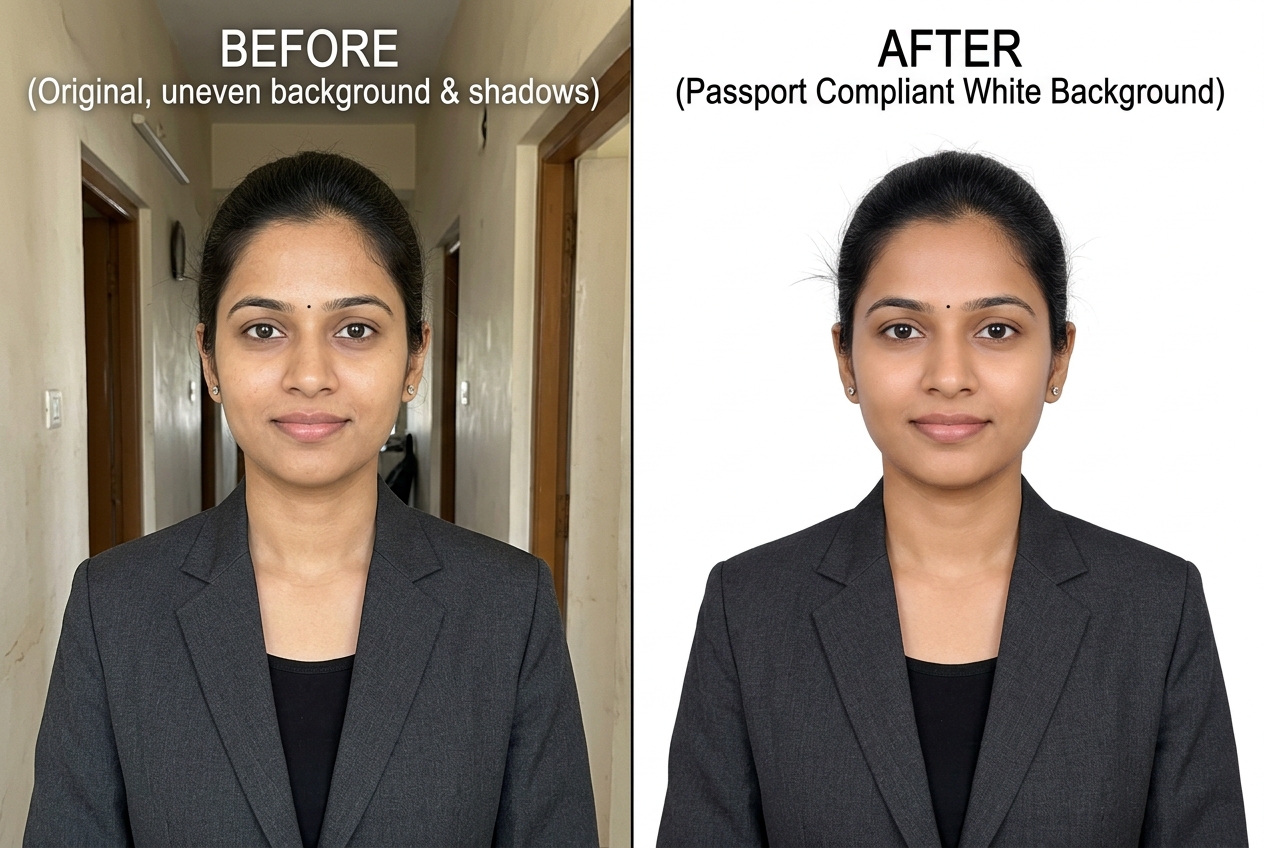
Before and After ID Photo Background Examples
आईडी और पासपोर्ट फोटो बिफोर और आफ्टर उदाहरण
Compare casual home portraits against finished pure white and visa-blue ID frames.
Standard Indian Passport, Visa, and Exam Photo Dimensions
Important YMYL Notice & Verification Marker (Section 20):
PhotoBackground.in is an independent image utility and is not affiliated with any government ministry or recruitment board. All dimensions and KB ranges below summarize official specifications and should be cross-checked against your cycle notification PDF.
| Application / Portal | Typical Frame Size | Background Rule | Verification Status |
|---|---|---|---|
| Indian Passport Seva (MEA) | 2 × 2 inch (51 × 51 mm) square | Plain pure white (#FFFFFF) | MEA Passport Seva Specification Circular |
| SSC / UPSC / IBPS Recruitment | 3.5 cm (width) × 4.5 cm (height) | Plain white or light-coloured background | Official SSC / UPSC / IBPS Notice |
| PAN Card (Protean / UTIITSL) | 3.5 cm × 2.5 cm (213 × 213 px scan spec) | Plain white background, clear facial features | Protean / UTIITSL PAN Guidelines |
| NTA Entrance Exams (NEET / JEE) | Passport size (3.5 × 4.5 cm) & Postcard (4 × 6 in) | White background, 80% face coverage without mask | Current NTA Information Bulletin |
For a deeper breakdown of pixel-to-millimetre conversions, DPI myths, and file-size rules, read our dedicated Indian passport and exam photo size guide or our general tutorial on making a photo background pure white.
Why Home Wall Selfies Get Rejected on Government Portals
Automated quality validators on Indian exam and passport portals check three things immediately: whether the background luminance is uniform behind both ears, whether the head is centered and occupies roughly 70%–80% of the vertical frame, and whether both eyes are open and level. When you take a photo against a domestic distemper wall under an overhead ceiling fan or tube-light, the camera records a grey-yellow gradient and a sharp diagonal neck shadow.
Replacing that uneven plaster with a pure white canvas via our White Background Photo tool solves the backdrop uniformity check. If your application also requires a scanned ink signature on a clean white strip, pair your portrait with our Signature Background Remover. And if you are preparing an employee ID badge, LinkedIn profile, or printed resume portrait that allows subtle studio backdrops instead of strict government white, browse our Plain Photo Backgrounds, Photo Studio Backgrounds, and HD Photo Backgrounds.
When the Tool Struggles (Spectacles, Headgear & Shadows)
Changing the wall behind you to #FFFFFF cannot fix problems on your face itself. Automated segmentation struggles when thick eyeglass frames cast double shadows around the temples, when white collars merge with a bright wall, or when harsh side lighting leaves one half of your face dark. Always shoot facing a diffused front light with spectacles removed.
Related Tools, Collections, and Guides
Indian Passport & Exam Photo Size Guide
Reference guide to 2×2 inch vs 3.5×4.5 cm framing, KB limits, and white background rules.
Signature Background Remover
Strip grey paper shadows from handwritten signatures for SSC, UPSC, and IBPS uploads.
Plain Photo Backgrounds (20 HD Plates)
Calibrated pure white, passport blue, and neutral matte plates for IDs and flyers.
Frequently Asked Questions About Passport Size Photo Backgrounds (अक्सर पूछे जाने वाले सवाल)
Does Indian Passport Seva require a 2×2 inch or 3.5×4.5 cm photograph?
Passport Seva online portals and ICAO biometric standards typically specify a square 2×2 inch (51×51 mm) frame with a plain white background, whereas many domestic recruitment exams (SSC, UPSC, IBPS) and Schengen visas request a rectangular 3.5×4.5 cm (35×45 mm) frame.
Is it safe to prepare my passport or PAN card photograph in an online browser tool?
Yes, on PhotoBackground.in every step runs locally inside your browser Web Worker. Your face photograph and identity portrait are never uploaded to a remote server or cloud bucket.
Can I wear spectacles in a passport or government exam photo?
Most Indian passport and national exam notices strongly advise removing spectacles because flash glare on lenses or thick frames hiding the eyes causes automated facial-biometric rejection.
What clothing colour works best when making a passport photo background white?
Wear a dark or medium-toned collared shirt, blazer, or kurta (navy blue, charcoal, maroon, or forest green). Avoid pure white shirts or cream collars, which blend into the #FFFFFF background along the shoulder seam.
What if the portal also asks for a separate scanned signature file?
After exporting your portrait as a form-ready JPG, open our Signature Background Remover to strip grey notebook paper shadows from your handwritten signature photo.